Configuration file#
To use the mahos system, you have to prepare a TOML configuration file. One good way to get used to this concept may be going through the Tutorial.
Here, we put the configuration file for Tutorial 2: Basic Measurement as a reference.
 1[global]
 2req_timeout_ms = 60000
 3poll_timeout_ms = 100
 4
 5[localhost.log]
 6module = "mahos.node.log_broker"
 7class = "LogBroker"
 8target = { log = "localhost::log" }
 9xpub_endpoint = "tcp://127.0.0.1:5555"
10xsub_endpoint = "tcp://127.0.0.1:5556"
11
12[localhost.server]
13module = "mahos.inst.server"
14class = "InstrumentServer"
15target = { log = "localhost::log" }
16log_level = "DEBUG"
17rep_endpoint = "tcp://127.0.0.1:5559"
18pub_endpoint = "tcp://127.0.0.1:5560"
19
20[localhost.server.instrument.source]
21module = "instruments"
22class = "VoltageSource_mock"
23[localhost.server.instrument.source.conf]
24resource = "VISA::DUMMY0"
25
26[localhost.server.instrument.meter]
27module = "instruments"
28class = "Multimeter_mock"
29[localhost.server.instrument.meter.conf]
30resource = "VISA::DUMMY1"
31
32[localhost.ivcurve]
33module = "ivcurve"
34class = "IVCurve"
35rep_endpoint = "tcp://127.0.0.1:5561"
36pub_endpoint = "tcp://127.0.0.1:5562"
37[localhost.ivcurve.target]
38log = "localhost::log"
39[localhost.ivcurve.target.servers]
40source = "localhost::server"
41meter = "localhost::server"
42
43[localhost.ivcurve_gui]
44module = "ivcurve_gui"
45class = "IVCurveGUI"
46[localhost.ivcurve_gui.target]
47ivcurve = "localhost::ivcurve"
This configuration file is visualized as a graph below.
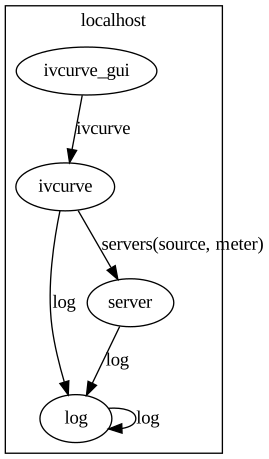
Node graph for IVCurve#
Node name#
The configuration of the whole system (global conf) is structured as a dictionary with nested string keys. TOML can effectively express such data structure. The top-level key specifies the hostname, except for the following two special names:
globalblock is used to define global configurations (default configurations for all the nodes).threadblock is used to define threaded nodes.
These two names should be considered reserved, and not be used as hostnames.
The second-level key is the nodename.
The fully qualified name of a node consists of the hostname and nodename,
and is expressed as <hostname>::<nodename> (e.g. localhost::server).
The configuration of each node (local config) is written as a dictionary under the nodename
(under the block [<hostname>::<nodename>]),
and this dictionary is bound as the conf attribute of the Node.
Fundamental keys#
Several keys define fundamental properties of a node’s function, and they are used for virtually all nodes:
module: The module name holding the Node class. It must be an importable Python module.class: The Node class name. The class must be an attribute of themodule.poll_timeout_ms: timeout for polling inbound requests (poll). It roughly defines the rate of the main loop (without any requests).req_timeout_ms: timeout for REQ-REP communication. It is referenced if the Node sends requests throughNodeClient.rep_endpoint: endpoint for REQ-REP communication. It is necessary if the Node accepts requests.pub_endpoint: endpoint for PUB-SUB communication. It is necessary if the Node publishes data.
Target#
The target is an important configuration defining (client-server) relations to other nodes.
This is also a dictionary with string keys, and values can take the following three types.
str(full name of the node) if the target is only one node (aslog = "localhost::log"in example above).list[str](list of full names) if the target can be multiple nodes.dict[str, str](instrument name to full name ofInstrumentServer): this is a special case for measurement nodes using InstrumentServers and simultaneously defines the instruments to be used (see lines 39-41 in the example above).
InstrumentServer#
The InstrumentServer holds Instruments and InstrumentOverlays.
An Instrument config is defined under [<hostname>.<nodename>.instrument.<instname>] (as in [localhost.server.instrument.source] at line 20), where the following three keys are given.
module: The module name holding the Instrument class. It must be an importable Python module, but leadingmahos.inst.can be omitted if a submodule inmahos.instpackage is used.class: The Instrument class name. The class must be an attribute of themodule.conf: The configuration dictionary for the Instrument (this is optional, but usually necessary).
An InstrumentOverlay config is defined under [<hostname>.<nodename>.instrument_overlay.<instname>], where the following three keys are given.
module: The module name holding the InstrumentOverlay class. It must be an importable Python module, but leadingmahos.inst.overlay.can be omitted if a submodule inmahos.inst.overlaypackage is used.class: The InstrumentOverlay class name. The class must be an attribute of themodule.conf: The configuration dictionary for the InstrumentOverlay. If a value in this dictionary is a string starting with$, it is considered a reference to Instrument / InstrumentOverlay in the same server. The overlay receives resolved value, i.e., an Instrument / InstrumentOverlay instance instead of a string.
Threading#
By default, each node runs as a process, and TCP is used for inter-process communication. When you need to reduce TCP communication overhead, nodes can be run as individual threads inside a single process. To enable this feature, you need to make slight modifications in the configuration file. Here, we put an example of modified configuration file for Tutorial 2: Basic Measurement.
 1[global]
 2req_timeout_ms = 60000
 3poll_timeout_ms = 100
 4
 5[thread.localhost]
 6server_ivcurve = ["server", "ivcurve"]
 7
 8[localhost.log]
 9module = "mahos.node.log_broker"
10class = "LogBroker"
11target = { log = "localhost::log" }
12xpub_endpoint = "tcp://127.0.0.1:5555"
13xsub_endpoint = "tcp://127.0.0.1:5556"
14
15[localhost.server]
16module = "mahos.inst.server"
17class = "InstrumentServer"
18target = { log = "localhost::log" }
19log_level = "DEBUG"
20rep_endpoint = "inproc://server_rep"
21pub_endpoint = "inproc://server_pub"
22
23[localhost.server.instrument.source]
24module = "instruments"
25class = "VoltageSource_mock"
26[localhost.server.instrument.source.conf]
27resource = "VISA::DUMMY0"
28
29[localhost.server.instrument.meter]
30module = "instruments"
31class = "Multimeter_mock"
32[localhost.server.instrument.meter.conf]
33resource = "VISA::DUMMY1"
34
35[localhost.ivcurve]
36module = "ivcurve"
37class = "IVCurve"
38rep_endpoint = "tcp://127.0.0.1:5561"
39pub_endpoint = "tcp://127.0.0.1:5562"
40[localhost.ivcurve.target]
41log = "localhost::log"
42[localhost.ivcurve.target.servers]
43source = "localhost::server"
44meter = "localhost::server"
45
46[localhost.ivcurve_gui]
47module = "ivcurve_gui"
48class = "IVCurveGUI"
49[localhost.ivcurve_gui.target]
50ivcurve = "localhost::ivcurve"
This configuration aims to run the server and ivcurve nodes as threads in a process.
The threaded nodes are defined as dict[str, list[str] under the [thread.<hostname>] block.
In the example, [thread.localhost] block is added at line 5.
Line 6 defines a set of threaded nodes named server_ivcurve that consists of the server and ivcurve nodes.
The mahos graph command can visualize the threaded nodes like below.
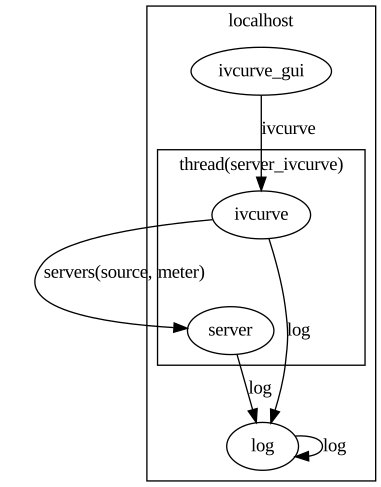
Node graph for IVCurve with threaded nodes#
The endpoint must be changed to take advantage of threaded nodes.
Lines 20-21 define endpoints with in-process protocols (inproc://).
This protocol is implemented (by ZeroMQ) with shared memory,
and thus it can boost the transfer rate of large data.
To run a set of threaded nodes, execute command like mahos run -t server_ivcurve
(-t is necessary to tell that you want to run threaded nodes instead of normal node).
The mahos launch command automatically detects threaded nodes and starts all of them
with matching hostname.