gui layer#
The gui layer provides a GUI frontend for meas layer (or sometimes inst layer). Common components are implemented in the mahos.gui package. We use Qt as the GUI toolkit, and frequently use PyQtGraph for data visualization.
Qt has its own (inter-or-intra thread) communication mechanism called signal and slot. A GUI event (such as a button click) emits a signal. If a signal is connected to slots (or methods), those methods are called.
Basic structure#
Because a GUI is basically a client of nodes, we have to implement two functions: Req (Requester) and Sub (Subscriber).
Req is relatively simple, because Req-Rep can be implemented as a single method call (a slot in Qt terminology).
For Sub, it becomes quite clean if we emit a signal when a subscribed message arrives.
Let’s see this point by observing the structure of an example IVCurveWidget from Tutorial 2: Basic Measurement.
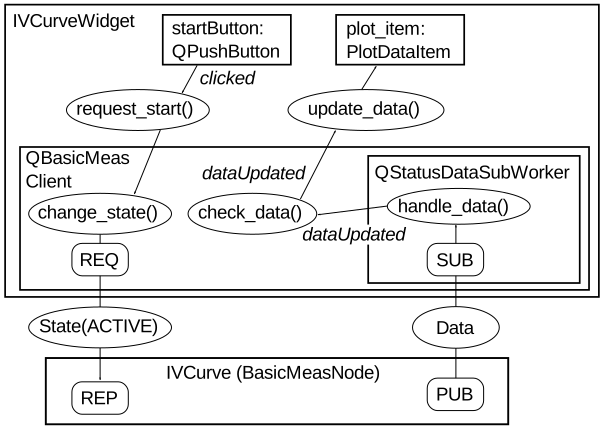
Class relationships of IVCurve GUI#
The QBasicMeasClient can be used as a Qt-version client of BasicMeasNode.
As noted, Req-Rep looks quite simple. When startButton is clicked, the click signal invokes the request_start() method (slot), which subsequently calls QBasicMeasClient.change_state() to send the request.
The data topic published by IVCurve is subscribed to by QStatusDataSubWorker, which runs in a dedicated thread (different from the main thread running the GUI loop).
When data arrives, QStatusDataSubWorker emits the dataUpdated signal, which is received by QBasicMeasClient.check_data() (this performs inter-thread communication).
check_data() again emits dataUpdated signal, which eventually updates the data visualized by plot_item.
It is important that QBasicMeasClient does all mahos communication tasks (Req-Rep and Pub-Sub); in other words, it converts Qt communication to mahos communication.
As a result, IVCurveWidget does not have to care about mahos communication and can focus on using signals and slots provided by QBasicMeasClient.