Tutorial 2: Basic Measurement#
In this tutorial chapter, we will learn how a basic measurement system is constructed in mahos (with mock instruments).
Preparation#
Before starting this, install the library and dependencies.
It is recommended to finish Tutorial 1: Communication before this.
Find the examples/ivcurve directory in the mahos repository.
We will use the files in it for this tutorial.
You can copy this directory somewhere on your computer if you want.
Running the mock#
Run all the nodes defined in our conf.toml with the command mahos launch.
You will see a GUI window pop up.
If you click the Start button, some noisy line (IV curve) is plotted and updated.
This is our mock for IV curve measurement.
The IV curve measurement is illustrated by the figure below. We have two instruments source (Voltage Source) and meter (Current meter) to measure IV characteristics of DUT (Device Under Test).
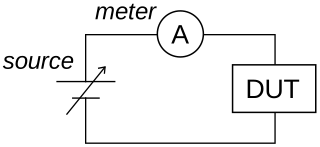
Schematic of IV curve measurement#
Visualizing config#
Let’s analyze what is happening behind the scenes.
First, try visualizing our nodes by mahos graph, and you will see a graph below.
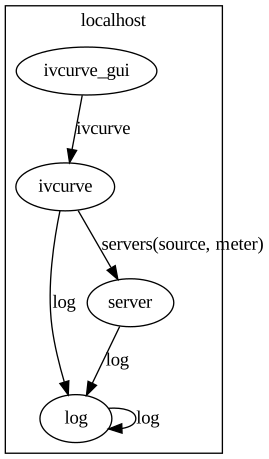
Node graph for IV curve#
As visualized, the config file defines four nodes.
We will go through these from bottom to top (from top to bottom in conf.toml).
The topmost group in conf.toml is named global.
This is a special group to define default values for all nodes.
If the same key is defined for a node, the global value is just ignored.
Otherwise, the global value is used.
(The behavior is similar to local and global variables in some programming languages.)
log#
The second group is named localhost.log.
It is important to observe log messages for debugging or monitoring.
Since mahos uses a distributed system,
the log sources (i.e., nodes) run on multiple processes.
To sort distributed logs, it is useful to gather logs to a single node,
and then redistribute them.
The LogBroker is implemented for this purpose.
It is highly recommended to define a log in conf.toml, as in the file for this tutorial.
You can see arrows labeled log are coming from server and ivcurve to the log node in the graph.
These arrows correspond to lines 15 and 37-38 in conf.toml.
(In Tutorial 1: Communication, we have omitted this and used dummy loggers.)
server#
The server (InstrumentServer) is defined as below.
12[localhost.server]
13module = "mahos.inst.server"
14class = "InstrumentServer"
15target = { log = "localhost::log" }
16log_level = "DEBUG"
17rep_endpoint = "tcp://127.0.0.1:5559"
18pub_endpoint = "tcp://127.0.0.1:5560"
19
20[localhost.server.instrument.source]
21module = "instruments"
22class = "VoltageSource_mock"
23[localhost.server.instrument.source.conf]
24resource = "VISA::DUMMY0"
25
26[localhost.server.instrument.meter]
27module = "instruments"
28class = "Multimeter_mock"
29[localhost.server.instrument.meter.conf]
30resource = "VISA::DUMMY1"
InstrumentServer is the node for inst layer to provide RPC for instrument drivers.
Thus, you do not need to write a node for this purpose; you write instrument driver classes (Instrument) instead.
The second group above [localhost.server.instrument.source] defines
an instrument source inside the server.
The VoltageSource_mock is an example of Instrument class here.
 9class VoltageSource_mock(Instrument):
10    def __init__(self, name, conf, prefix=None):
11        Instrument.__init__(self, name, conf=conf, prefix=prefix)
12
13        self.check_required_conf(["resource"])
14        resource = self.conf["resource"]
15        self.logger.info(f"Open VoltageSource at {resource}.")
16
17    def set_output(self, on: bool) -> bool:
18        self.logger.info("Set output " + ("on" if on else "off"))
19        return True
20
21    def set_voltage(self, volt: float) -> bool:
22        self.logger.debug(f"Dummy voltage {volt:.3f} V")
23        return True
24
25    # Standard API
26
27    def start(self, label: str = "") -> bool:
28        return self.set_output(True)
29
30    def stop(self, label: str = "") -> bool:
31        return self.set_output(False)
32
33    def set(self, key: str, value=None, label: str = "") -> bool:
34        if key == "volt":
35            return self.set_voltage(value)
36        else:
37            self.logger.error(f"Unknown set() key: {key}")
38            return False
As the name suggests, this class is just a mock and doesn’t consume any external resources.
However, a real instrument usually requires a resource identifier for communication (VISA resource, IP address, DLL path, etc.), and we have included how to pass such configuration to an Instrument.
We define a configuration dictionary (conf) as line 23-24 in conf.toml.
This is passed to Instrument and referenced by self.conf (line 14).
Line 13 uses a utility method to check the existence of the required key.
Only two functions of voltage source are implemented: set_output() and set_voltage().
Meanings of these may be obvious.
We assume an output relay for voltage source, that is turned on/off by set_output().
The output voltage can be set by set_voltage().
Line 27 and below adapt these methods to the Standard Instrument APIs.
The set_output() is wrapped by start and stop.
And set_voltage() is by set.
Note that most of the Standard Instrument APIs (except get) must return bool (True on success).
In Standard Instrument APIs, set, get, and configure accept generic arguments, so type information is lost (the function signature of set_voltage() cannot be seen from the client).
We can define InstrumentInterface to recover this, as below.
This procedure looks like a duplication of effort, but the positive side is that
we can define an explicit interface (which method is exported and which is not, as in static programming languages).
79class VoltageSourceInterface(InstrumentInterface):
80    def set_voltage(self, volt: float) -> bool:
81        """Set the output voltage."""
82
83        return self.set("volt", volt)
Let’s interact with the server.
Launch server and log with mahos launch log server.
In the second terminal, mahos log to print the logs.
And mahos shell server to start IPython shell for server.
There are two ways to call the functions:
# Method1: raw client calls
cli.start("source")
cli.set("source", "volt", 12.3)

# Method2: call through interface
from instruments import VoltageSourceInterface
source = VoltageSourceInterface(cli, "source")
source.start()
source.set_voltage(12.3)
ivcurve#
ivcurve is in the second layer (meas layer): core measurement logic.
We have defined ivcurve in the config as below.
32[localhost.ivcurve]
33module = "ivcurve"
34class = "IVCurve"
35rep_endpoint = "tcp://127.0.0.1:5561"
36pub_endpoint = "tcp://127.0.0.1:5562"
37[localhost.ivcurve.target]
38log = "localhost::log"
39[localhost.ivcurve.target.servers]
40source = "localhost::server"
41meter = "localhost::server"
Line 40-41 tells us that we need instruments source and meter (both on localhost::server) for this measurement.
Operating from shell or script#
Before looking into the code, let’s run and interact with the ivcurve.
Launch nodes with mahos launch log server ivcurve.
In the second terminal, mahos log to print the logs.
And mahos shell ivcurve to start IPython shell for ivcurve.
The ivcurve measurement can be performed with the following snippet.
params = cli.get_param_dict()
cli.start(params)
data = cli.get_data()
cli.stop()
Here, get_data() returns IVCurveData defined in ivcurve_msgs.py,
and data.data is the measurement result: a 2D NumPy array of shape (number of voltage points (params["num"]), number of sweeps).
For a bit more meaningful application, try executing file measure_and_plot.py and understanding it.
cli.get_param_dict() returns a ParamDict, str-keyed dict of Param.
Param is wrapper of basic (mostly builtin) types with default value, bounds (for int or float), etc.
You can set values of parameters by set() and pass it to cli.start() as in measure_and_plot.py.
Reading IVCurve node#
What happens at ivcurve node side?
Look at implementation of IVCurve node in ivcurve.py.
IVCurve is a subclass of BasicMeasNode,
which is a convenient Node implementation for simple measurement nodes.
We explain how this node works by following the main() method line by line.
172def main(self):
173    self.poll()
174    publish_data = self._work()
175    self._check_finished()
176    self._publish(publish_data)
First line of main() (line 173) calls poll().
Here, this node checks incoming requests, and if there is a request, the handler is called.
The handler is implemented in BasicMeasNode (read the implementation if you are interested) and calls change_state() or get_param_dict() [1] according to the request.
When cli.get_param_dict() is called, request is sent to ivcurve and the result of IVCurve.get_param_dict() is returned.
The result of this method is hard-coded here; however, the parameter bounds may be determined by instruments for real application.
By observing change_state(), you will see that this node has explicit state: BinaryState.IDLE or BinaryState.ACTIVE.
All measurement nodes are advised to have explicit state like this, and BinaryState is the simplest case.
cli.start() is a shorthand of change_state(ACTIVE), and cli.stop() is change_state(IDLE).
When state is changing from IDLE to ACTIVE, self.sweeper.start() is called.
self.sweeper is an instance of the Sweeper class that communicates with the server and performs the actual work.
At the second line of main() (line 174), through _work(), self.sweeper.work() is called.
A sweep measurement for IV curve is done there; source is used to apply voltage and the current is read by meter.
The third line of main() (line 175) checks if we can finish the measurement.
Measurement is finished when params["sweeps"] is positive and the sweeps have already been repeated params["sweeps"] times (see Sweeper.is_finished()).
By the final line of main() (line 176), the node status and data are published.
ivcurve_gui#
The ivcurve_gui, a GUI frontend of ivcurve, is defined in the last group in conf.toml.
The class IVCurveGUI is in ivcurve_gui.py.
This is what we were operating in Running the mock.
Let’s launch all the nodes by mahos launch and confirm GUI is working.
Then, start the IPython shell with mahos shell ivcurve and send start or stop requests.
Furthermore, try running measure_and_plot.py script (stop the measurement before running).
It is important that we can operate the measurement from both the GUI and programs (shell or a custom script).
This extensibility is one of the advantages of distributed systems.
If you have experience in Qt (PyQt) programming, let’s take a look at ivcurve_gui.py.
The GUI component (IVCurveWidget) is composed quite simply by virtue of QBasicMeasClient.
This class is a Qt-version of BasicMeasClient and emits Qt signals when subscribed messages are received.
In other words, it translates MAHOS communication into Qt communication (signal-slot).
All we have to do for widget implementation is connect signals to slots that update the GUI state (lines 102-103) and send requests (lines 124-136).
There is a slightly special initialization pattern (init_with_status()).
We cannot initialize the GUI completely without the target node (ivcurve) because we have to know the target’s status (by get_param_dict() for example).
But we are not sure if the target node is up when GUI starts.
To assure this point, we first disable the widget (line 29) and connect statusUpdate event to init_with_status() (line 26).
When the first status message arrives, this method is called and the remaining initialization steps are completed.
The widget is enabled finally at line 105.
This method is called only once because the signal is disconnected at line 79.
Modified configurations#
Threading#
There are additional configuration files conf_thread.toml and conf_thread_partial.toml in the example directory, which are examples of threaded nodes.
The threaded nodes can be used to reduce overhead of TCP communication.
See Threading section in the configuration file document for details.
Overlay#
If you need to reduce TCP communication overhead between the measurement node (IVCurve) and the InstrumentServer, InstrumentOverlay can also help.
The IVCurve node sends commands to source and meter for each data point in a voltage sweep.
By using the overlay, the sweep operation can be executed at InstrumentServer side.
The modified example using overlay is defined in conf_overlay.toml,
and the classes are implemented in overlay.py and ivcurve_overlay.py.
You can understand the concept by observing the differences between this and the default examples.
Footnotes